SELF-GUIDED DIGITAL PLAYBOOK

Mac Deleted File Recovery Playbook

Protect the source. Find the right route. Verify the result.
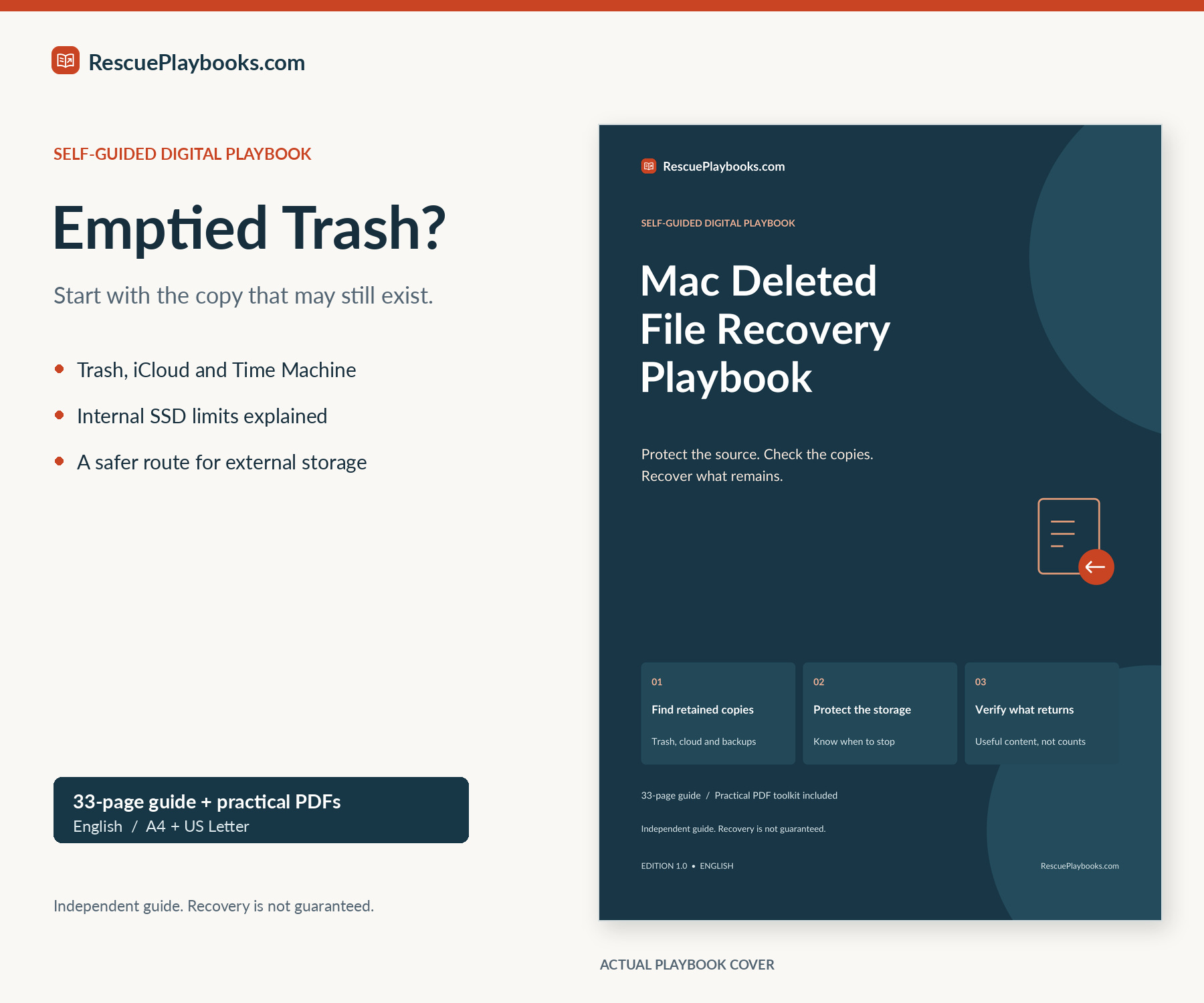
Follow a source-first workflow for Trash, iCloud Drive, Time Machine, local snapshots and supported app recovery areas. When no retained copy is available, distinguish internal-SSD limits from a controlled healthy-external-drive image workflow. Verify actual content, record partial results and know when to stop.

33-page PDFRead or printFillable toolkit

Not a data recovery service. We do not access your Mac, inspect your files or carry out recovery steps for you.

Recovery is not guaranteed. Results depend on surviving data, backups, retention, permissions, encryption and storage condition.

$49USDOne-time payment
Get This Playbook

PDF playbook + practical toolkit · Delivery after payment

Independent publication. Not affiliated with or endorsed by Apple, Microsoft, R-Tools Technology or CGSecurity. You are paying for an independently organized guide, practical PDF worksheets and adaptable messages—not recovery software, access to Apple support or work performed on your device.

WHAT'S INCLUDED

Inside your playbook.

Focused guidance. Practical resources. Clear next steps.

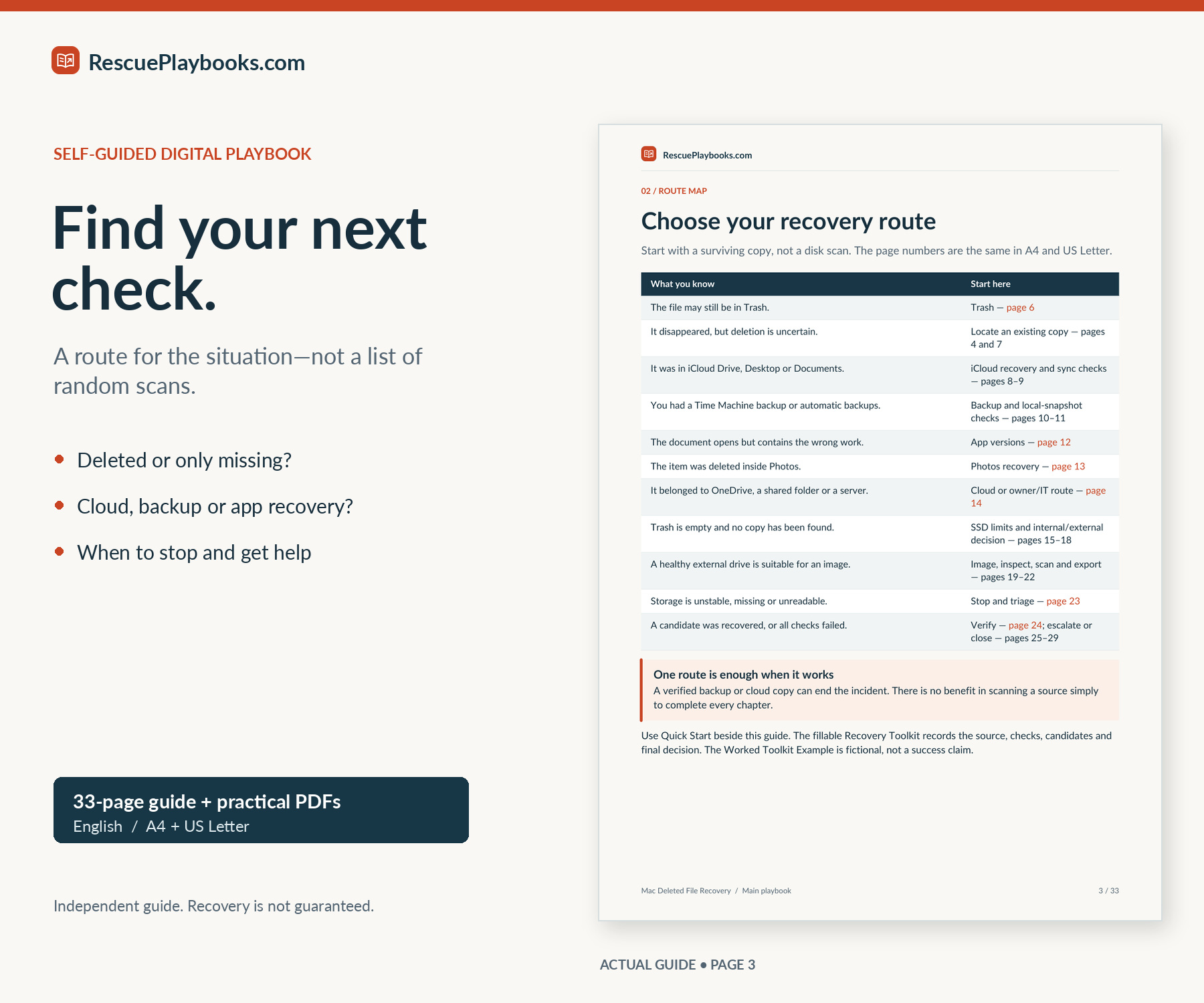
A route for the actual loss

Separate a deleted file, a misplaced copy, a cloud placeholder and overwritten document content.

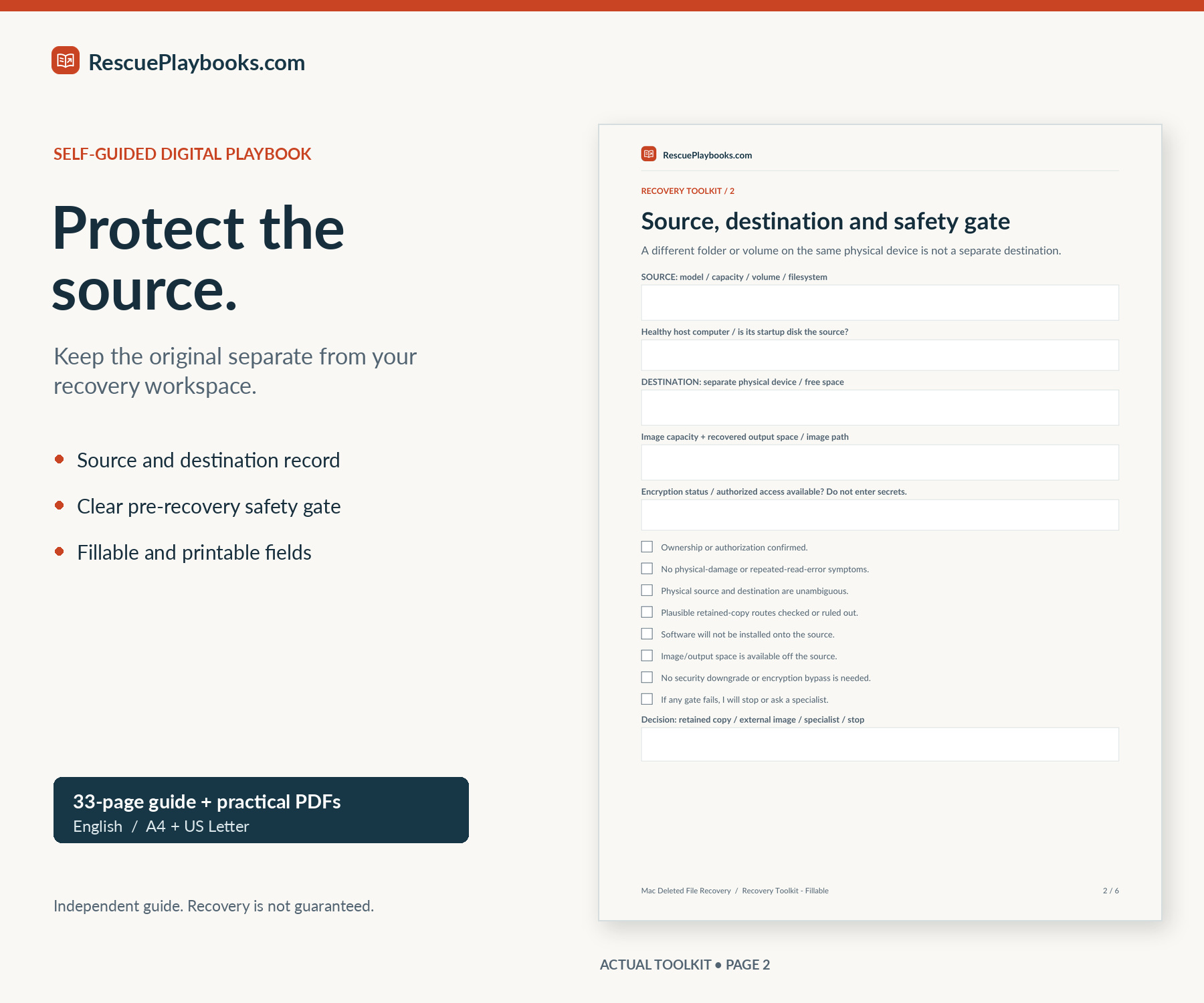
Source-first safety checks

Identify the physical source and destination, avoid destructive shortcuts and recognize stop conditions.

Trash, iCloud and backup routes

Check retained items, Time Machine, local snapshots and copies held by an owner or administrator.

App and Photos recovery checks

Use supported document versions and Photos Recently Deleted without treating them as a universal undelete tool.

Healthy external-drive image workflow

Follow a documented R-Studio example for imaging, inspection, scanning and export, plus an optional PhotoRec image-only route.

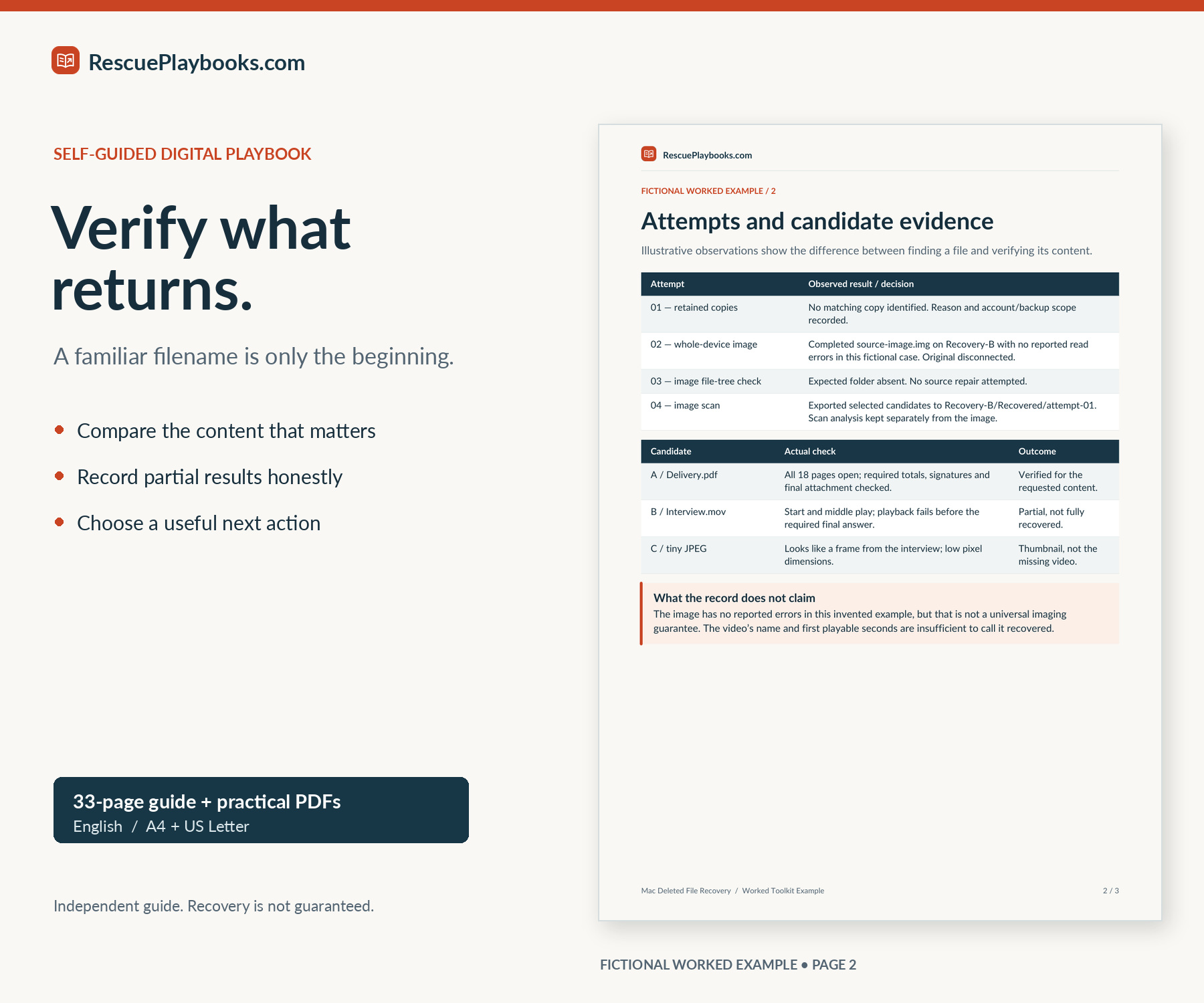
Verification and realistic limits

Understand SSD/TRIM and FileVault boundaries; judge actual saved content rather than filenames or scan counts.

Six-page fillable recovery toolkit

Record the incident, storage gate, attempts, candidates, verification and final next action.

Examples and adaptable messages

Use fictional worked records and focused requests for a collaborator, administrator, specialist or software vendor.

YOUR DIGITAL DOWNLOAD

One playbook.
Read, print, and take action.

Choose your paper size. Keep the practical tools beside you.

33-page PDF playbook

Source-first recovery routes, fictional scenarios and 24 linked official/vendor references.

A4 + US Letter

Read on screen or print the size that matches your paper.

Practical PDF companions

Quick Start, fillable toolkit, worked example, and adaptable messages.

Files in the package

  • 33-page PDF playbook with 24 official/vendor references
  • 3-page Quick Start PDF
  • 6-page fillable and printable Recovery Toolkit
  • 3-page fictional Worked Toolkit Example
  • 3-page Copy and Paste Messages companion
  • A4 + US Letter editions, plus a 2-page Start Here PDF

A4 and US Letter editions contain the same content. No audio file is included.

What's not included.

Hands-on recovery, remote computer access, one-to-one technical support, recovery software licenses or storage hardware. Physical drive repair, low-level internal Mac acquisition, RAID or Fusion Drive reconstruction, enterprise retention administration or Photos library-database repair. Password or encryption bypass, recovery of content that was never retained anywhere, reversal of processed TRIM, or any guaranteed recovery outcome.

Independent publication. Not affiliated with or endorsed by Apple, Microsoft, R-Tools Technology or CGSecurity. Recovery software licenses and specialist services are not included.

MADE FOR SITUATIONS LIKE YOURS

Who this playbook is for.

You deleted a file and emptied Trash.

Check retained copies before deciding whether a storage-recovery attempt is appropriate.

A file vanished from Desktop, Documents or iCloud Drive.

Distinguish deletion from account, folder and sync changes, then use the relevant cloud route.

You had Time Machine, but the backup disk is not connected.

Check whether an existing backup or local snapshot can supply the needed file without clearing retained history.

You lost work on a healthy external drive, USB device or memory card.

Use the source/destination gate before imaging and analyzing a copy on a healthy Mac.

A recovery tool found files, but you do not know whether they are intact.

Compare saved candidates, check required content and record partial results honestly.

You need to decide whether to stop or ask a specialist.

Recognize internal-SSD, encryption and physical-failure limits, then prepare a focused handoff.

BEFORE YOU BUY

A few things worth knowing.

Help with your purchase
What exactly will I receive?
An English 33-page PDF playbook, a 3-page Quick Start, a 6-page fillable and printable Recovery Toolkit, a 3-page fictional worked example and a 3-page message companion. These five documents come in both A4 and US Letter. A separate 2-page Start Here PDF explains the package. The ZIP contains 11 PDFs.
How many pages are in the package?
The main playbook has 33 pages. With the companions and Start Here, there are 50 unique content pages. A4 and US Letter contain the same material and are not additional chapters or twice the content.
Can I read, print and fill in the PDFs?
Yes. Read downloaded PDFs offline in a compatible reader and print the matching paper size. The Recovery Toolkit contains interactive fields and checkboxes. Save, close and reopen a local test copy to check that entries persist; long entries may require an extra sheet. Online recovery services still need an internet connection.
What language and Mac versions does it cover?
All materials are in English. The guide uses documented macOS, iCloud and Time Machine workflows, with version-sensitive labels and conditions stated where relevant. It is not a compatibility guarantee for every historical or future Mac or recovery-tool version.
How will I get my files?
After payment, download the complete ZIP from your order page. We will also email a download link and purchase receipt. Extract the ZIP, open Start Here.pdf and choose A4 or US Letter. If the Mac startup disk is the affected source, download and read on another device.
Can it help after Trash has been emptied?
It helps you check retained cloud items, backups, local snapshots and other copies, then decide whether a controlled storage-recovery attempt is appropriate. Emptying Trash ends the ordinary Trash route. The guide does not promise that deleted data remains recoverable.
Does it guarantee recovery from an internal SSD or a FileVault-encrypted Mac?
No. The guide explains why SSD/TRIM, encryption, later writes and missing keys can limit or prevent recovery. It prioritizes retained copies and routes low-level internal Mac acquisition to a suitable specialist. It does not include a password bypass or instructions to weaken startup security.
Does it cover external drives and memory cards?
Yes, within a healthy, authorized and clearly identified single-device workflow. It includes a full-image-first software example using a healthy host and separate destination. Damaged devices, repeated read errors, RAID and Fusion Drive reconstruction are escalated rather than treated as routine DIY recovery.
Will you recover my files or need access to them?
No. This is a self-guided publication, not a recovery service. We do not remotely access your Mac, inspect documents, sign in to accounts or carry out the steps. Do not send passwords, FileVault recovery keys or private recovered files for purchase support.
Is this a one-time payment?
Yes. The listed price is $49 USD for one purchase of the playbook and its included PDFs. Your final total is shown before you pay.
Why buy this when official support articles are free?
You are paying for an independently organized decision workflow, source-preservation checks, candidate verification, usable worksheets, fictional examples and adaptable messages. The 24 official/vendor references remain free and are linked in the guide. There is no secret recovery method or paid access to Apple support.
Are recovery tools or specialist services included?
No. The guide uses R-Studio for Mac as a documented conditional example and describes an optional PhotoRec image-only route. Recovery software licenses, storage devices, laboratory work and one-to-one support are separate. Review current tool requirements and trial/export limits before spending money.
What if I am not satisfied?
Customers may request a refund within 14 days of purchase by emailing support@rescueplaybooks.com with their order reference and a short description of the issue. Approved refunds are returned to the original payment method. This voluntary guarantee does not limit mandatory consumer rights. Refund Policy
What should I do if the drive is damaged or the methods do not find a useful file?
Stop repeated access when there are physical-failure symptoms, preserve the source and use the specialist handoff. If the device is healthy but a route returns no useful copy, record exactly what was checked and select a justified next action. The playbook includes partial-result and stopping decisions; further attempts may not help.